RATtrap: Building a Smart Security Household Firewall
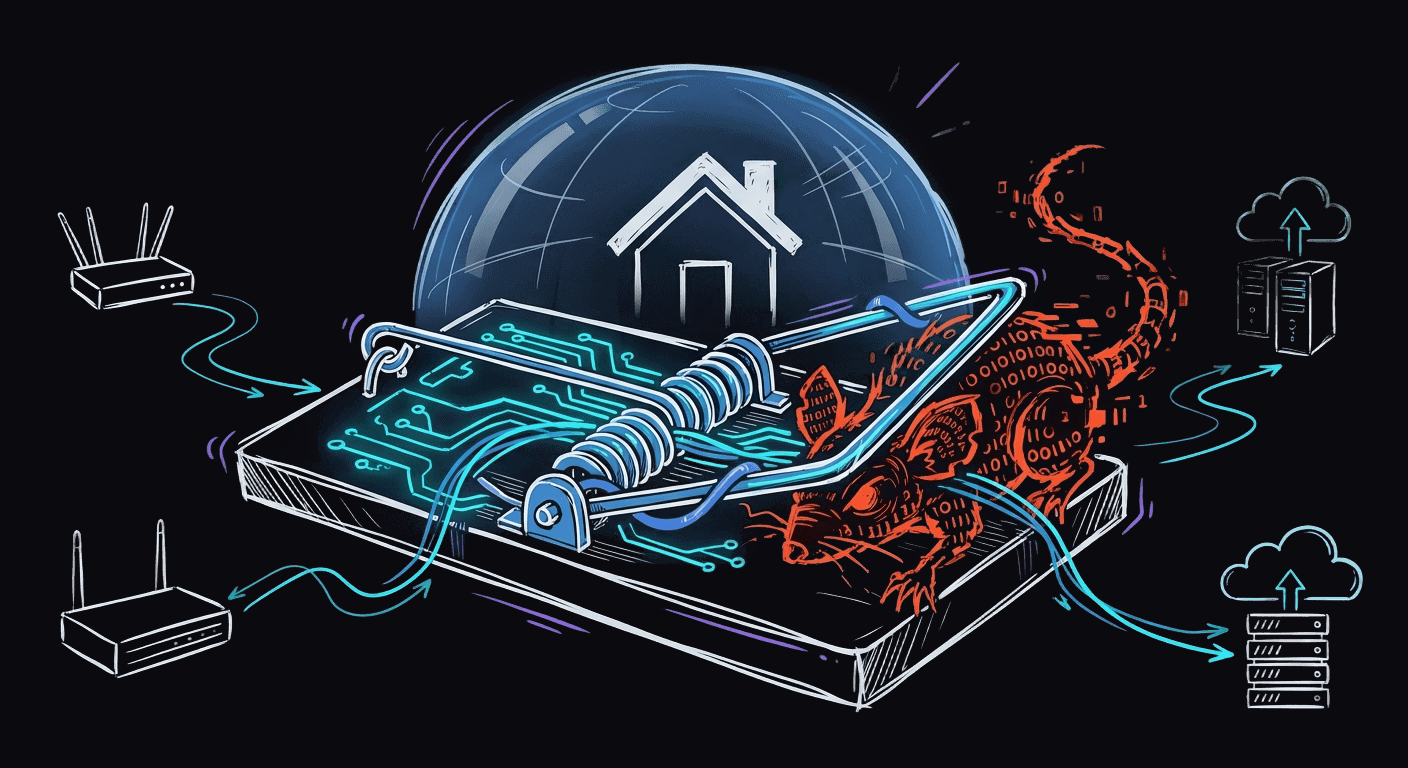
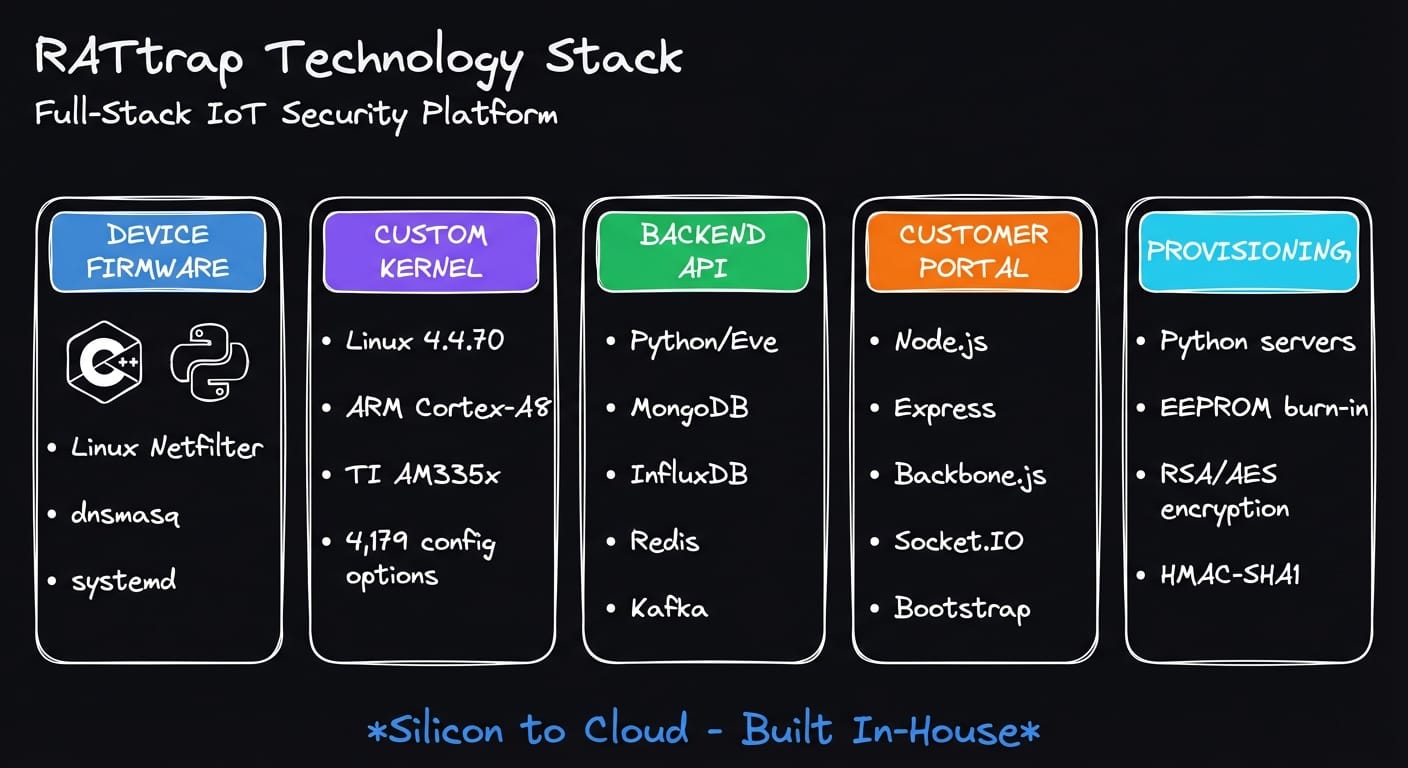
Building a hardware security product requires mastery across the entire stack—from kernel drivers to cloud infrastructure. This is the story of RATtrap, a transparent network security appliance designed to protect home and small business networks from threats. Built entirely in-house by our team at IoT Defense, the platform spans five major engineering domains:
Device Hardware
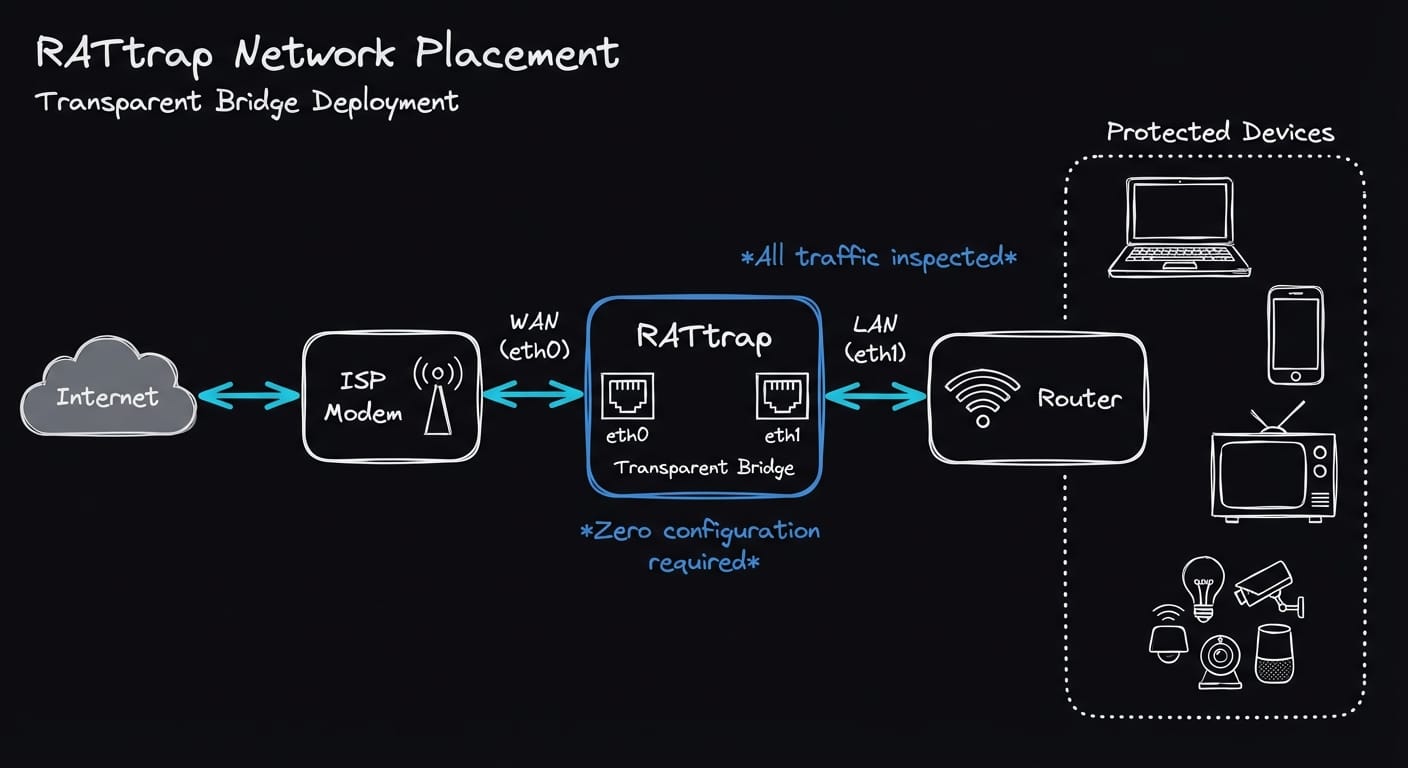
RATtrap is an embedded IoT security appliance that operates as a transparent network bridge. It sits inline between a customer's router and their ISP equipment, inspecting and filtering traffic without requiring any network reconfiguration. Transparency means the device requires no IP address of its own and introduces no routing changes—users simply plug it in.
Hardware Platform
The device runs on a Texas Instruments AM335x SoC featuring a 32-bit ARM Cortex-A8 processor running at 1GHz. This platform was chosen for its balance of performance, power efficiency, and robust Linux support—critical factors for a 24/7 security appliance.
Key hardware interfaces:
- Dual Gigabit Ethernet ports bridged together for transparent operation
- Three status LEDs (system, LAN, WAN) for real-time device state feedback
- EEPROM for tamper-resistant credential storage
- eMMC storage with multi-partition layout (recovery, primary, secondary)
Software Stack
The device firmware is predominantly C/C++ (~70%) for performance-critical paths, with Python (~20%) handling configuration and network management, and Bash (~10%) for build orchestration.
| Component | Technology | Purpose |
|---|---|---|
| Packet Inspection | Linux Netfilter + iptables/ebtables | Traffic filtering and NAT |
| DNS Filtering | Custom dnsmasq v2.91 | Threat blocking with multi-list support |
| Credentials | Ed25519 signatures | Tamper detection |
| IPC | POSIX message queues | Inter-daemon communication |
| Init | systemd + Netplan | Service management |
Architecture Highlights
Zero-Touch Configuration: The device automatically detects network topology without user intervention. A kernel module (rtnetk.ko) analyzes traffic patterns: LAN interfaces exhibit fewer unique destination IPs, while WAN interfaces show significantly more variety. This statistical approach eliminates manual setup entirely.
Three-Tier Pipeline: The architecture cleanly separates concerns:
- Kernel layer (
rtnetk.ko) — Packet sniffing via Netfilter hooks - Orchestration layer (
rtmond) — State machine with debouncing for stability - Configuration layer (
rtnetsetup) — Network setup, NAT rules, IP selection
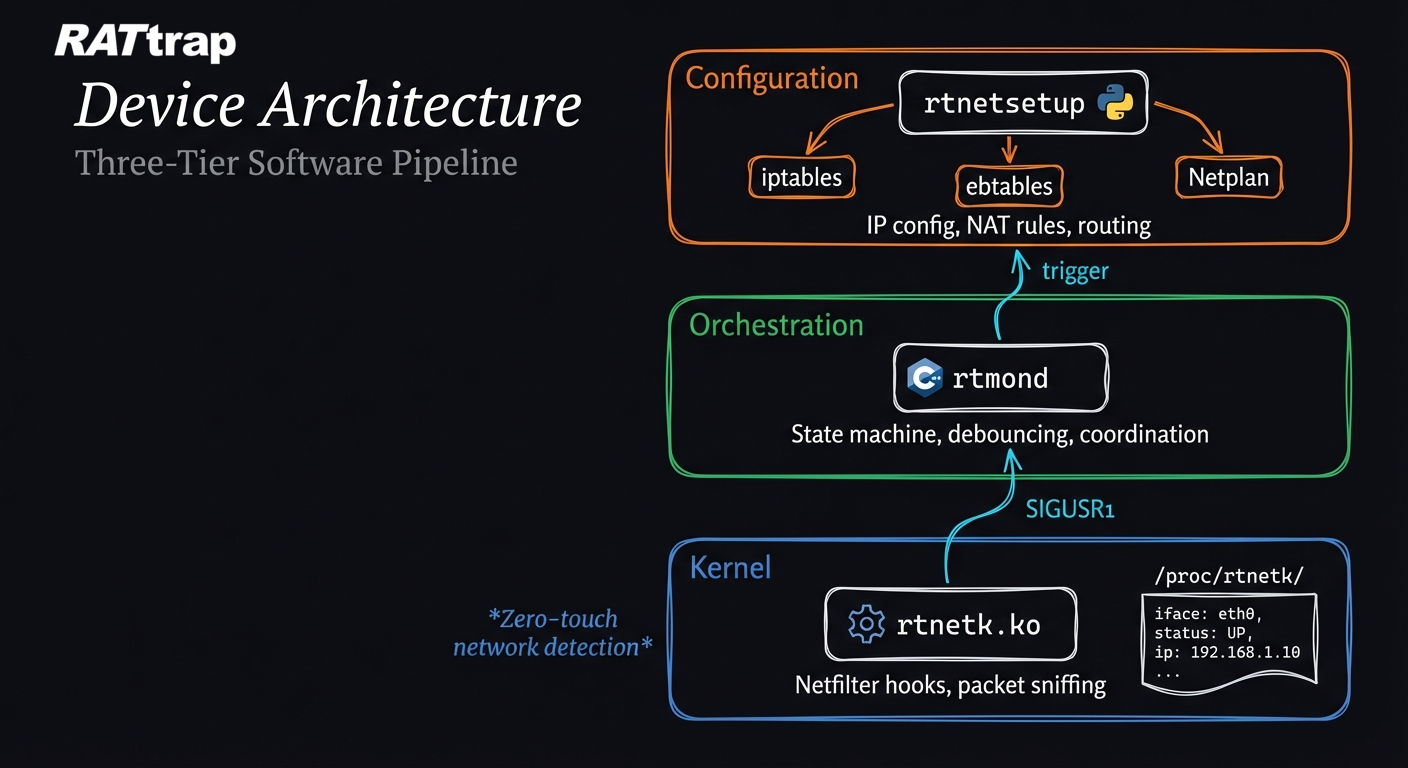
Modular Daemon Design: Eight specialized daemons handle distinct responsibilities: LED control, EEPROM management, DNS analytics, and threat alerting. They communicate via signals and message queues, enabling independent updates and fault isolation.
Custom OS & Kernel Development
Off-the-shelf Linux distributions include thousands of unnecessary drivers and services—attack surface we couldn't afford. Running a security appliance on a general-purpose kernel is insufficient. RATtrap uses a custom-configured Linux 4.4.70 kernel with 4,179 carefully selected configuration options.
Kernel Configuration Philosophy
The kernel is tuned for determinism over flexibility:
| Setting | Choice | Rationale |
|---|---|---|
| Preemption | Non-preemptible | Predictable packet processing latency |
| Timer | 250Hz | Balance between responsiveness and overhead |
| Memory Split | 3G/1G user/kernel | Standard embedded allocation |
Security Hardening
Every security-relevant kernel feature is enabled:
- CC_STACKPROTECTOR_STRONG — Compiler-level stack smashing protection
- SECCOMP_FILTER — Syscall filtering for process sandboxing
- Full Netfilter stack — Connection tracking, NAT, packet marking
- Audit subsystem — Comprehensive syscall logging for forensics
- NETLABEL — Network packet labeling for security policies
IoT-Specific Features
The kernel includes drivers for:
- Industrial I/O (IIO) sensors — Temperature and humidity monitoring
- GPIO LED control — Direct hardware status indication
- Watchdog timer — Automatic recovery from hangs
- Real-time clock — With power control capabilities
Debugging & Observability
Despite being a production kernel, full debugging capabilities remain enabled:
- KGDB for remote kernel debugging
- ftrace and kprobes for dynamic tracing
- BPF JIT for efficient in-kernel packet filtering programs
The custom device tree (am335x-rattrap.dts) defines the exact hardware layout—dual RGMII Ethernet, GPIO-controlled LEDs, I2C sensors, and the TPS65217 power management IC.
Backend API
The cloud backend aggregates telemetry from deployed devices, processes threat intelligence, and serves the customer portal. Built on Python with the Eve framework—a REST API toolkit optimized for MongoDB—it prioritizes reliability and data integrity.
Technology Stack
| Layer | Technology | Purpose |
|---|---|---|
| API Framework | Eve (Flask-based) | RESTful endpoints with schema validation |
| Primary Database | MongoDB | Device records, configurations, events |
| Time-Series | InfluxDB | Traffic metrics, bandwidth statistics |
| Cache | Redis | Notification throttling (prevents alert fatigue) |
| Message Queue | Apache Kafka | Real-time event streaming |
| Deployment | uWSGI + systemd | Production process management |
Authentication Model
Devices authenticate using HMAC-SHA1 signatures. Each device has a unique secret key (RTKID) provisioned at manufacturing. Every API request includes a signature computed over the payload:
Authorization: {device_id}:{base64(HMAC-SHA1(secret_key, payload))}
This approach provides strong authentication without the overhead of certificate management—important for resource-constrained IoT devices.
Data Pipeline
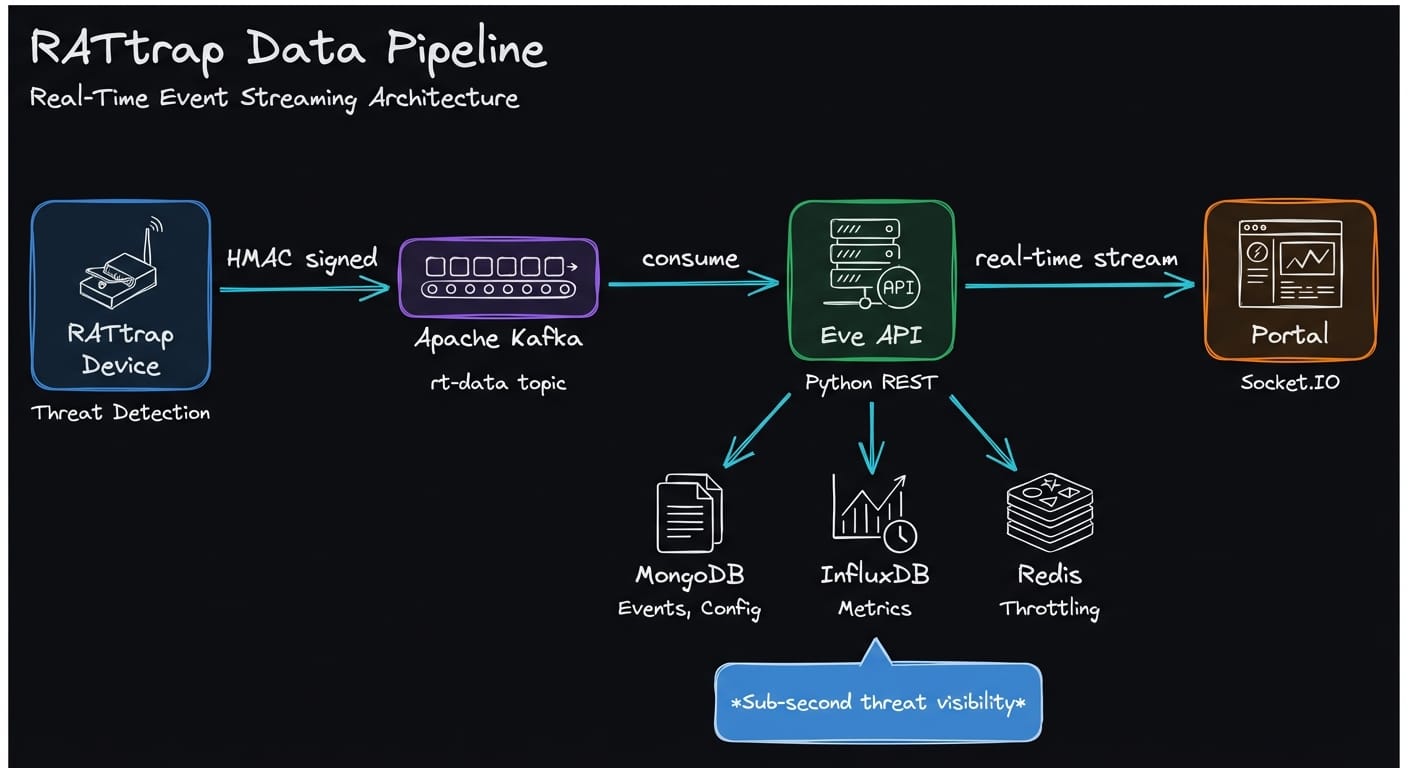
The API implements a multi-tier processing model:
- Hot Path (Synchronous): Request validation → HMAC verification → GeoIP enrichment → Kafka publish
- Warm Path (Near Real-time): InfluxDB metrics writes, throttled notifications via FCM/Mailgun
- Cold Path (Batch): MongoDB aggregations, historical analysis
Key Endpoints
/data— Receives attack/threat telemetry with automatic geolocation enrichment/heartbeat— Device health check-ins, IP change tracking, tamper detection/device_config— Per-device settings (DNS, ad-blocking, whitelists)/devicemap— Network device discovery data/traffic— Bandwidth and packet statistics (feeds InfluxDB)/prov/*— Device provisioning and credential management
External Integrations
- Firebase Cloud Messaging — Push notifications to mobile apps
- Mailgun — Email alerts with embedded Google Maps for attack geolocation
- MaxMind GeoIP2 — Offline IP-to-location resolution
Customer Portal
The customer-facing portal provides real-time visibility into network security. Built on Node.js with Express, it emphasizes stability and real-time data streaming.
Technology Stack
| Layer | Technology | Purpose |
|---|---|---|
| Runtime | Node.js 14.x | Server-side JavaScript |
| Framework | Express.js | MVC with server-side rendering |
| Frontend | Backbone.js + jQuery | Lightweight client-side interactivity |
| Templates | Jade/Pug | Server-rendered HTML |
| Styling | Bootstrap 3 + LESS | Responsive UI components |
| Real-time | Socket.IO | Live event streaming |
| Charts | Chart.js + C3.js (D3-based) | Data visualization |
| Auth | Passport.js | OAuth (Twitter, GitHub, Facebook, Google) + local |
Real-Time Architecture
The portal maintains persistent WebSocket connections via Socket.IO. A Kafka consumer subscribes to the rt-data topic and broadcasts filtered events to authenticated clients. Users monitor attack attempts, blocked domains, and traffic anomalies as they occur.
Device → Kafka → Portal (consumer) → Socket.IO → Browser
Key Features
- Live Attack Dashboard — Real-time threat visualization with geographic mapping
- Device Management — Multi-device accounts, naming, configuration
- Traffic Analytics — Bandwidth, ad-blocking metrics, connection statistics
- Two-Factor Authentication — TOTP-based OTP with QR code setup
- Internationalization — English, Japanese, French, Chinese support
Multi-Tenant Design
The portal supports white-label deployments through configuration-driven branding. This enables partner reselling under different product names while sharing infrastructure.
Hardware Manufacturing & Provisioning
Bringing hardware to market requires a robust provisioning system. RATtrap uses a dual-mode approach supporting both factory manufacturing and field deployment.
Credential Structure
Each device receives a unique credential tuple at provisioning:
| Credential | Format | Purpose |
|---|---|---|
| RTFID | XXXX-XXXX-XXXX-XXXX |
Human-readable device serial (on labels) |
| RTUID | 40-char hex | Backend user identifier |
| RTKID | 40-char hex | HMAC secret key for API authentication |
These credentials are burned into the device's EEPROM, surviving firmware updates and factory resets.
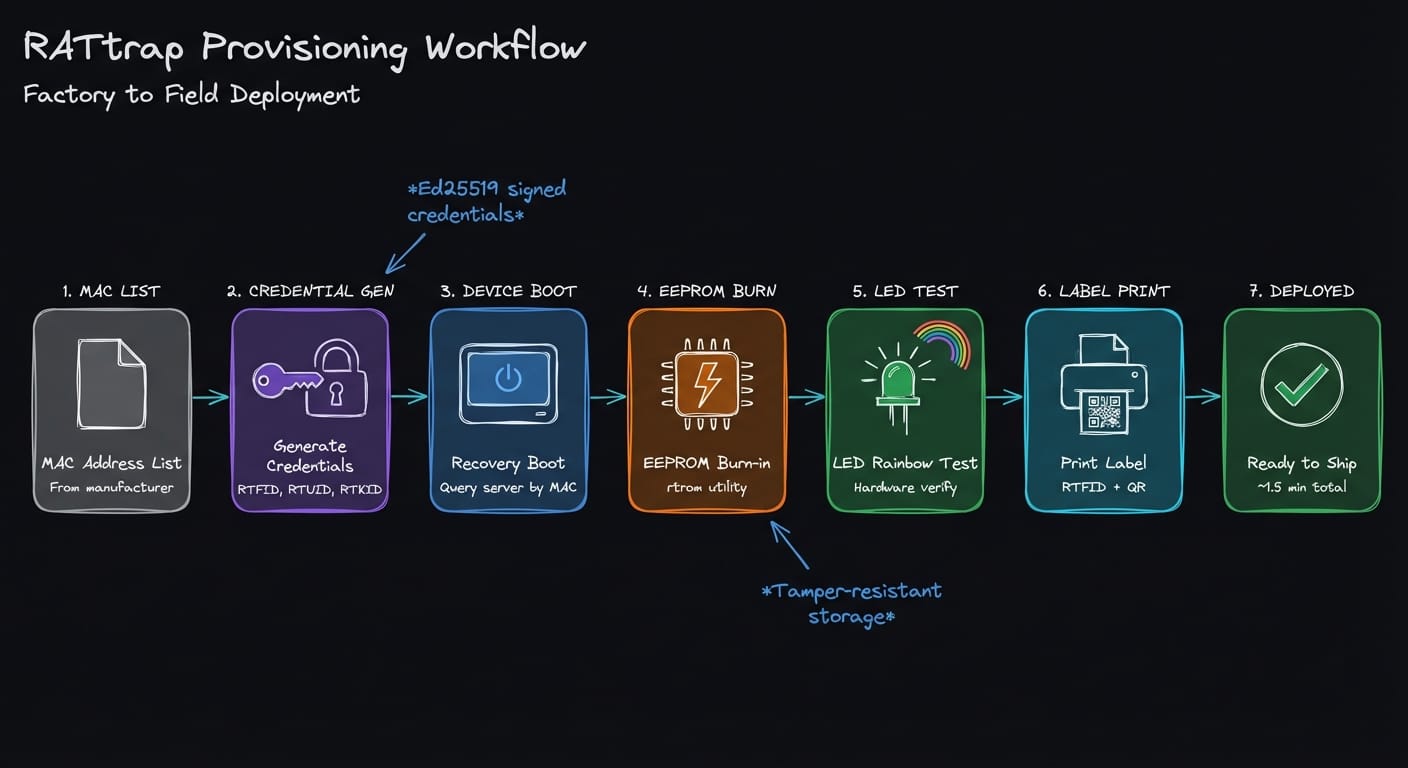
Factory Provisioning (SnProvServer)
For manufacturing partners, a local HTTP server handles high-throughput provisioning:
- Manufacturer provides MAC address list
- IoT Defense pre-generates credential tuples per MAC
- Devices boot into recovery partition
- Provisioning script queries server by MAC address
- Credentials written to EEPROM via
rtromutility - LED rainbow test verifies hardware functionality
- Label printed with RTFID and QR code
This process takes approximately 1.5 minutes per device, including firmware flashing.
Field Provisioning (RtProvServerBroker)
For smaller deployments or replacements, a cloud-brokered system provides flexibility:
- Provisioning station connects to
api.iotdef.comvia VPN - Credentials delivered in encrypted archives (RSA-2048 + AES-256-CBC)
- Offline fallback with locally decrypted credential database
- Complete audit trail of provisioned and replaced devices
Security Measures
- Encrypted Transport: RSA-2048 OAEP for key wrapping, AES-256-CBC for data
- Network Isolation: Factory provisioning runs on isolated networks
- One-Time Credentials: Each device receives unique, non-revocable keys
- Tamper Detection: Ed25519 signatures verify credential integrity at boot
- Audit Logging: Every provisioning event logged with timestamp and device ID
Firmware Image Variants
| Image Type | Duration | Use Case |
|---|---|---|
| SDCard Minimal | 1.5 minutes | Standard factory provisioning |
| Direct Write (DD) | 1–2 minutes | Fastest option, pre-partitioned image |
| SDCard Full | 12–14 minutes | Field deployment with fallback options |
Conclusion
Building RATtrap required deep expertise across every layer of the stack:
- Hardware: Selecting the right SoC, designing for reliability
- Kernel: 4,179 configuration decisions balancing security and performance
- Firmware: Modular daemon architecture with zero-touch configuration
- Backend: Polyglot data architecture (MongoDB + InfluxDB + Redis + Kafka)
- Portal: Real-time threat visualization via Socket.IO and Kafka
- Manufacturing: Secure provisioning from factory floor to customer network
The key insight: vertical integration—owning every layer from silicon to cloud—enabled optimizations for security that off-the-shelf solutions cannot achieve. When you control the kernel, you can harden it. When you control provisioning, you can guarantee credential integrity. When you control the full pipeline, you can deliver sub-second threat visibility.
The result is a security appliance that protects networks transparently, requires no configuration, and provides real-time visibility into threats—leveraging open-source foundations with custom engineering where it matters most.
Research (threat intelligence, attack detection algorithms, and machine learning models) will be covered in a separate post.